
As organizations scale their use of StreamNative Cloud, the distinction between day-to-day operational resources and organization-level administration becomes increasingly important. Until now, some organization-scoped resources—most notably Secrets—appeared alongside instance-level resources in the console. This blurred ownership boundaries, increased cognitive load, and made it harder for users to quickly find what they needed.
To address this, we’re introducing a new Organization Settings experience in the StreamNative Cloud console. This update brings a clearer ownership model, cleaner navigation, and a scalable foundation for future organization-level capabilities.
Why Organization Settings?
At a high level, this change is about clarity and focus:
- Organization-scoped resources should live in one predictable place
- Runtime and operational workflows should stay focused on daily work
- The console should reflect how resources are actually owned and managed
With Organization Settings, the StreamNative Cloud console now clearly separates the Org Working Area (where you run and operate services) from Org Settings (where you administer and govern the organization).
What’s Changing
This update introduces three major improvements:
- A simplified global profile dropdown
- A cleaner Org Working Area focused on runtime resources
- A brand-new Organization Settings area for administration
Let’s take a closer look at each.
Simplified Profile Dropdown (Global)
We’ve streamlined the profile dropdown to make it faster and more predictable to use, while keeping essential actions easily accessible.
The updated profile dropdown now includes:
- Current organization information Organization name
- Organization ID (with copy support)
Switch OrganizationNotificationsDocumentationSupportLogout
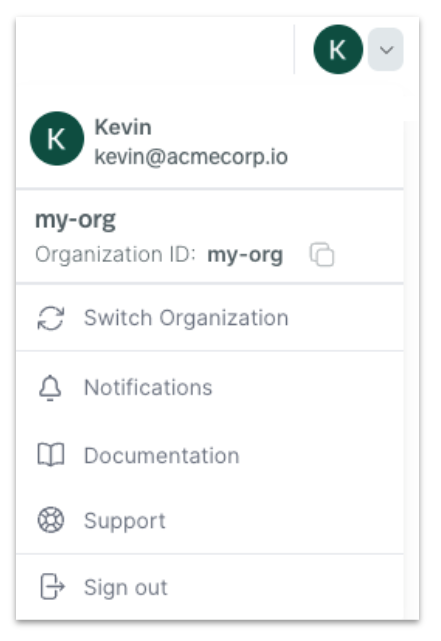
This simplification removes unnecessary clutter and provides a consistent entry point for global actions across the console.
Org Working Area: Focused on Day-to-Day Resources
The left-hand navigation in the Org Working Area is now intentionally focused on resources used for daily operations.
Resources
The Resources section continues to be the primary workspace for developers and operators and includes:
- Instances
- UniLink (Public Preview)
- Cloud Environments
These are the resources you interact with regularly to build, run, and operate streaming workloads.
ADMIN Section
To clearly distinguish administrative workflows from runtime work, we’ve introduced a dedicated ADMIN section in the left navigation:
- Settings – the entry point into the new Organization Settings area
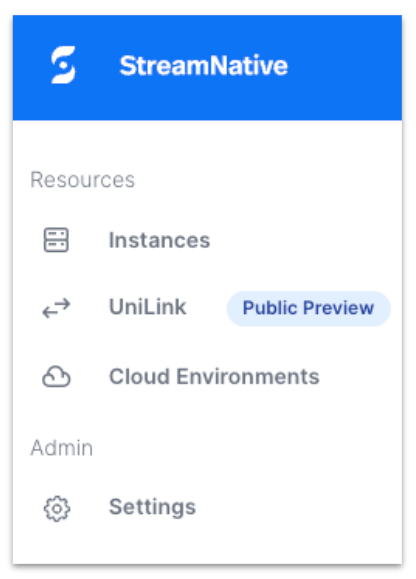
This separation ensures that org-level administration is always available—but never in the way of day-to-day work.
Organization Settings: A Dedicated Admin Experience
Clicking ADMIN → Settings takes you into a new Organization Settings mode, designed specifically for organization-level administration.
A Dedicated Settings Shell
Once in Organization Settings, you’ll notice several UI cues that clearly indicate you’re in an administrative context:
- A top navigation bar with the context set to Settings
- A breadcrumb showing Settings as the current location
- A clear Exit Settings button that takes you back to the Org Working Area
This makes it easy to move between operational work and administrative tasks without losing context.
Grouped Settings Navigation
Organization Settings uses a structured, grouped left-hand navigation that scales as new capabilities are added.
General
- Billing & Payment
- Organization Usage
Access
- Users
- Service Accounts
- Access
Security
- Secrets
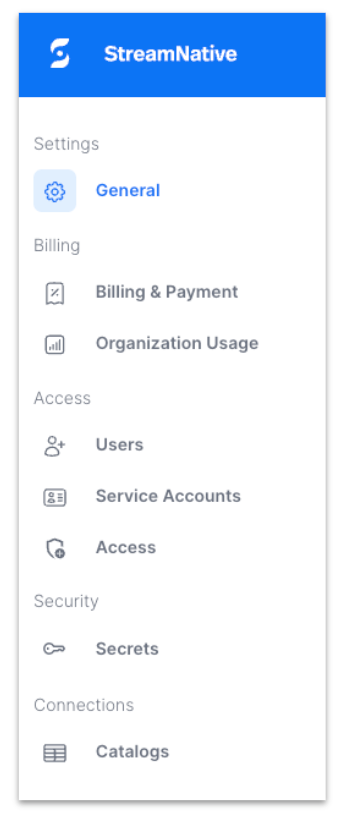
By grouping related capabilities together, Organization Settings makes it easier for org admins to discover and manage shared resources in one place.
Secrets: Correct Ownership, Clear Routing
One of the most important changes in this update is the relocation of Secrets.
What changed?
- Secrets have been removed from instance-level navigation
- Secrets now live under Organization Settings → Security
Why this matters
Secrets are organization-scoped by nature. While they may be referenced by instances or pool members, they are not owned by them. Moving Secrets into Organization Settings:
- Reflects the correct ownership model
- Prevents confusion about where Secrets should be managed
- Aligns the UI with how Secrets are actually used across the organization
What This Means for You
For Organization Admins
- All org-level resources are now centralized in one place
- Administrative workflows are easier to find and manage
- The UI clearly reflects responsibility and ownership
For Developers and Operators
- Cleaner navigation with fewer admin-only objects in daily workflows
- A predictable structure: Working Area for runtime work, Settings for administration
For the Platform
- Reduced cognitive load and fewer “where do I find this?” moments
- A scalable information architecture for future org-level features
- A stronger foundation for governance and administration as organizations grow
Get Started
The new Organization Settings experience is rolling out starting January 27th, 2026. Once available, we recommend taking a few minutes to explore the updated navigation and familiarize yourself with the new layout.
As always, we welcome your feedback as you start using Organization Settings. Your input helps us continue improving the StreamNative Cloud experience.
Happy streaming!