

We’re thrilled to announce the general availability of Role-Based Access Control (RBAC) in StreamNative Cloud — a powerful capability designed to secure your entire data streaming infrastructure. RBAC is now enabled by default across all organizations and cluster types (Serverless, Dedicated, and BYOC), delivering a consistent and granular approach to permission management that simplifies how access is defined and enforced across every resource in your environment — from organization-wide policies down to individual topics.
Granular, Hierarchical Permissions
Role-Based Access Control (RBAC) is now the core mechanism for managing access in StreamNative Cloud. It enables you to assign fine granular permissions to users and service accounts, ensuring teams and applications have access only to the resources they need.
The permission model follows a clear hierarchy, cascading from the highest level (Organization) down to the most granular (Topic): Organization → Instance → Cluster → Tenant → Namespace → Topic
This structure allows you to grant broad permissions at an organizational or infrastructure scope—such as giving an operator read-only access to an entire cluster—or define narrowly scoped permissions at a resource or entity level, like restricting a service account to produce messages to a single topic.
Key Highlights:
- Generally available for all StreamNative Cloud users: RBAC is automatically enabled for all organizations, providing robust security from day one without any complex setup.
- Comprehensive Predefined Roles: We’ve introduced a comprehensive set of predefined roles that span every scope of your cloud resources. From broad administrative roles such as org-admin and billing-admin to fine-grained data-plane roles like topic-producer and topic-consumer, you now have the flexibility to enforce the principle of least privilege with precision.
- Simplified Management: StreamNative Cloud lets you configure and oversee role assignments through the Cloud Console or automate them with the snctl CLI and Terraform provider. This approach streamlines access control while providing clear visibility and auditability over who can access which resources.
- Secure Access Across Users and Applications: Assign broad operational roles (such as cluster-operator) to human users managing infrastructure, and grant highly specific, granular roles (like namespace-topic-consumer) to service accounts used by applications. This clear separation of duties strengthens security, enforces least-privilege access, and improves governance across automated workflows.
Quick Start: Assign a Role in 1 Minute
Getting started with RBAC is straightforward. For example, you can grant a new user org-readonly access to your entire organization to support auditing or compliance reviews.
Manage Role by snctl
You can use snctl to grant a role to a user account or service account with just one command.

Manage Role by Console
Alternatively, you can manage it on the console. From the User Menu, click 'Account & Access'.
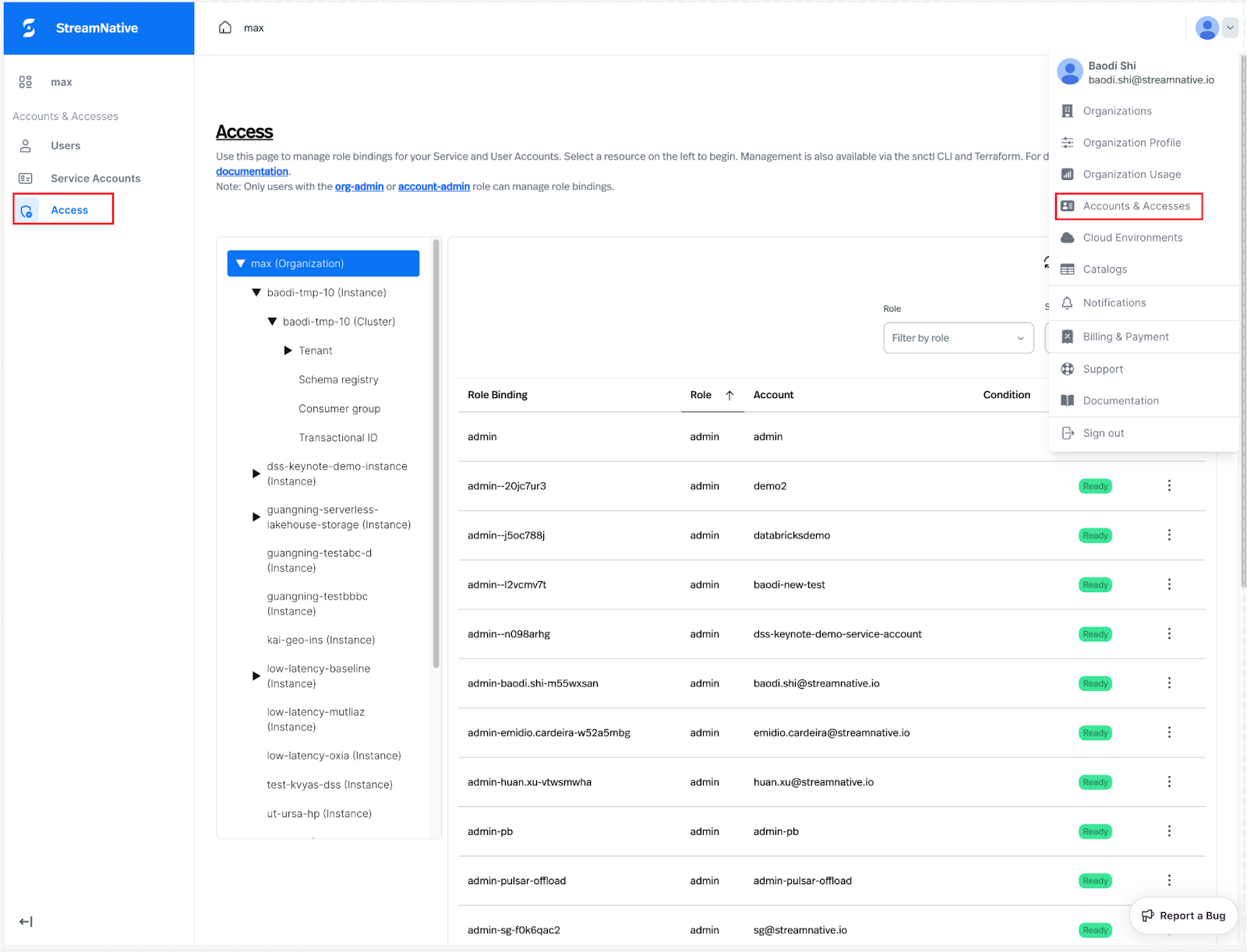
On the access page, you can select the resource type, such as organization, and then view the permissions currently assigned under that resource.
You can click "Add rolebinding" to add a new role and select the corresponding service account or user account.
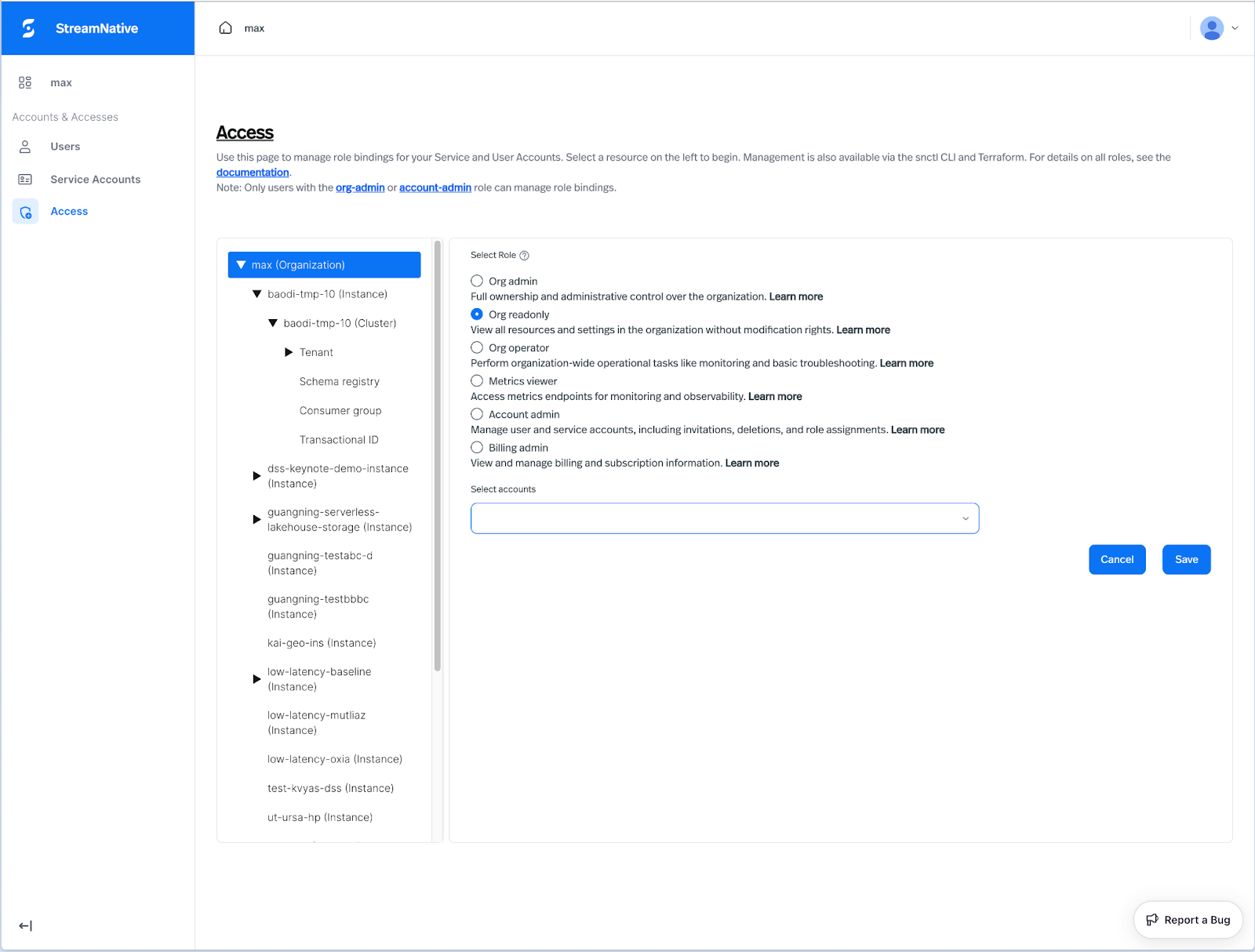
Once applied, the account will be able to view all resources in the organization without being able to make any changes. For more usage examples, please refer to the documentation.
We invite you to explore the new Role-Based Access Control (RBAC) in StreamNative Cloud today. Log in to your console to review predefined roles, assign permissions, and experience how streamlined access management can enhance both security and productivity for your teams and applications.
What’s Next
This release of predefined roles represents a significant milestone in our ongoing mission to deliver best-in-class security for your data streaming platform. By establishing a consistent and standardized framework for permission management, we’re laying the groundwork for more advanced capabilities. Over the coming months, we plan to introduce additional predefined roles tailored to a variety of operational and compliance scenarios — from fine-grained data-plane permissions to specialized administrative roles — making it easier to align access control with organizational policies.
Get Started
Sign up for a trial and get started for free. Leverage the following resources to learn more about StreamNative Cloud. Visit your StreamNative Cloud Console today to explore the available roles and start securing your resources. To learn more about all the predefined roles and their specific permissions, check out our detailed RBAC documentation.
Happy (and secure) streaming!