
A table can tell you what data is available. Understanding where that data came from often requires a second investigation. Which streaming cluster supplied it? Which topic carried the events? How does that source connect to the table an analyst is querying?
StreamNative’s integration with Databricks Bring Your Own Lineage (BYOL) brings that context into Unity Catalog. StreamNative invokes Databricks’ external metadata and lineage APIs to represent streaming sources and connect them to their destination tables. Databricks users can then trace a table’s ingestion source back to the StreamNative cluster and topic that supplied its data.
The problem: data crosses systems, but its lineage can stop at the boundary
Streaming data frequently begins outside Databricks. Applications publish events into topics, and those events become lakehouse tables used for analytics, security investigations, and AI workloads. The data reaches its destination, but the source context may remain in another platform’s configuration, logs, or documentation.
Unity Catalog captures lineage for workloads running on Databricks. External workloads require additional metadata to make their relationships visible in the same graph. Without that connection, teams face four familiar gaps:
- Unclear source origin. A table’s lineage may omit the external cluster and topic that supplied it.
- Hard-to-trace external processing. Ingestion steps outside Databricks can leave a gap between a source and its destination.
- Hidden downstream consumers. Reports and applications outside the catalog may be absent unless their relationships are added.
- Fragmented impact analysis. Teams must assemble dependencies from multiple systems before evaluating a change.
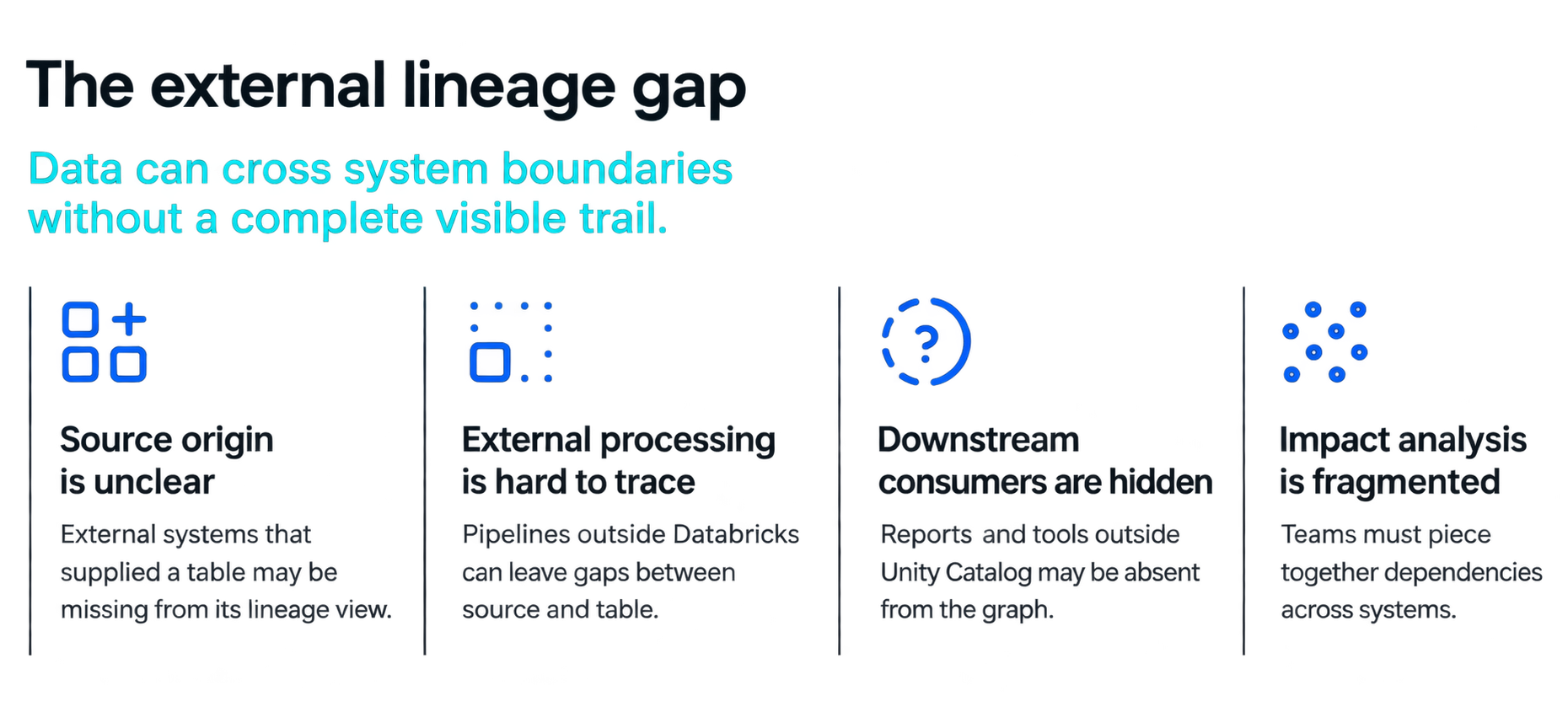
Figure 1. Data can cross system boundaries without a complete visible trail.
For example, consider a security operations team at a financial data processing company that analyzes login events to detect potential account takeovers. Before investigating a suspicious pattern, a security analyst needs to identify the event stream that populated the table. A platform engineer making changes to that stream needs to understand which downstream tables may be affected. External lineage makes these connections visible, helping both teams trace data from its source to its use in security analysis.
Connecting the streaming source to the lakehouse table
Databricks BYOL extends the lineage graph through external metadata objects and relationships. An external metadata object represents an asset outside Databricks; a lineage relationship connects that asset to a Unity Catalog object.
StreamNative uses these APIs to bring streaming source context into Unity Catalog, including the source cluster ID and topic. In the example shown below, the security.login_events topic in StreamNative cluster c-v9djmmi supplies data to an Iceberg table named security_login_events. The integration makes this topic-to-table relationship visible in Unity Catalog, allowing users to trace the table’s data back to the specific cluster and topic that supplied it.
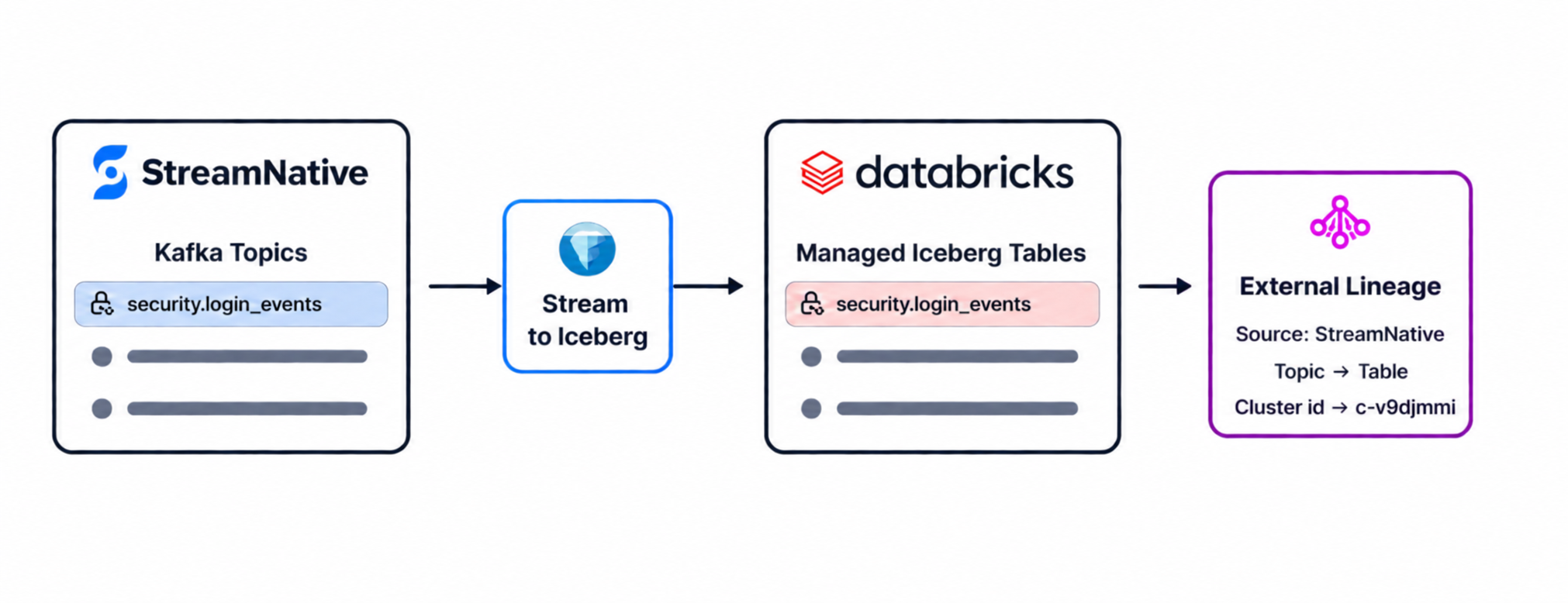
Figure 2. The data flow connects a StreamNative topic to an Iceberg table; BYOL records the relationship in Unity Catalog.
The integration provides two complementary pieces of information: the identity of the streaming source, and its relationship to the destination table. Source properties such as cluster and topic identifiers let users distinguish streams even when topic names are similar across environments.
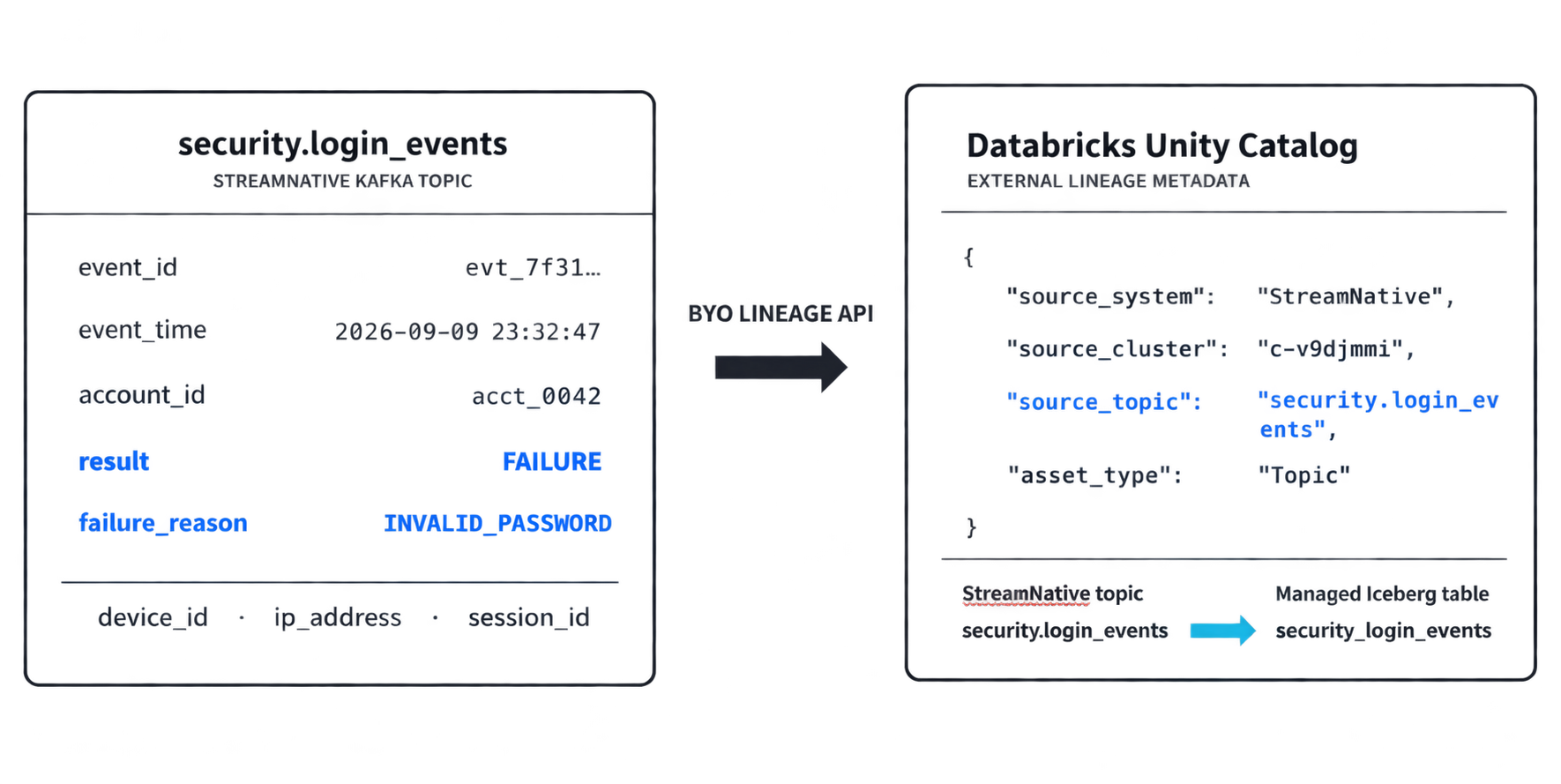
Figure 3. Conceptual illustration of source metadata accompanying the topic-to-table relationship.
The properties shown in the product screenshots below provide the concrete example.
What Databricks users can see
The Unity Catalog screenshot shows an external metadata node representing a StreamNative topic, connected to the security_login_events table. Selecting the node reveals its description and properties, with System set to STREAM_NATIVE and Type set to Topic.
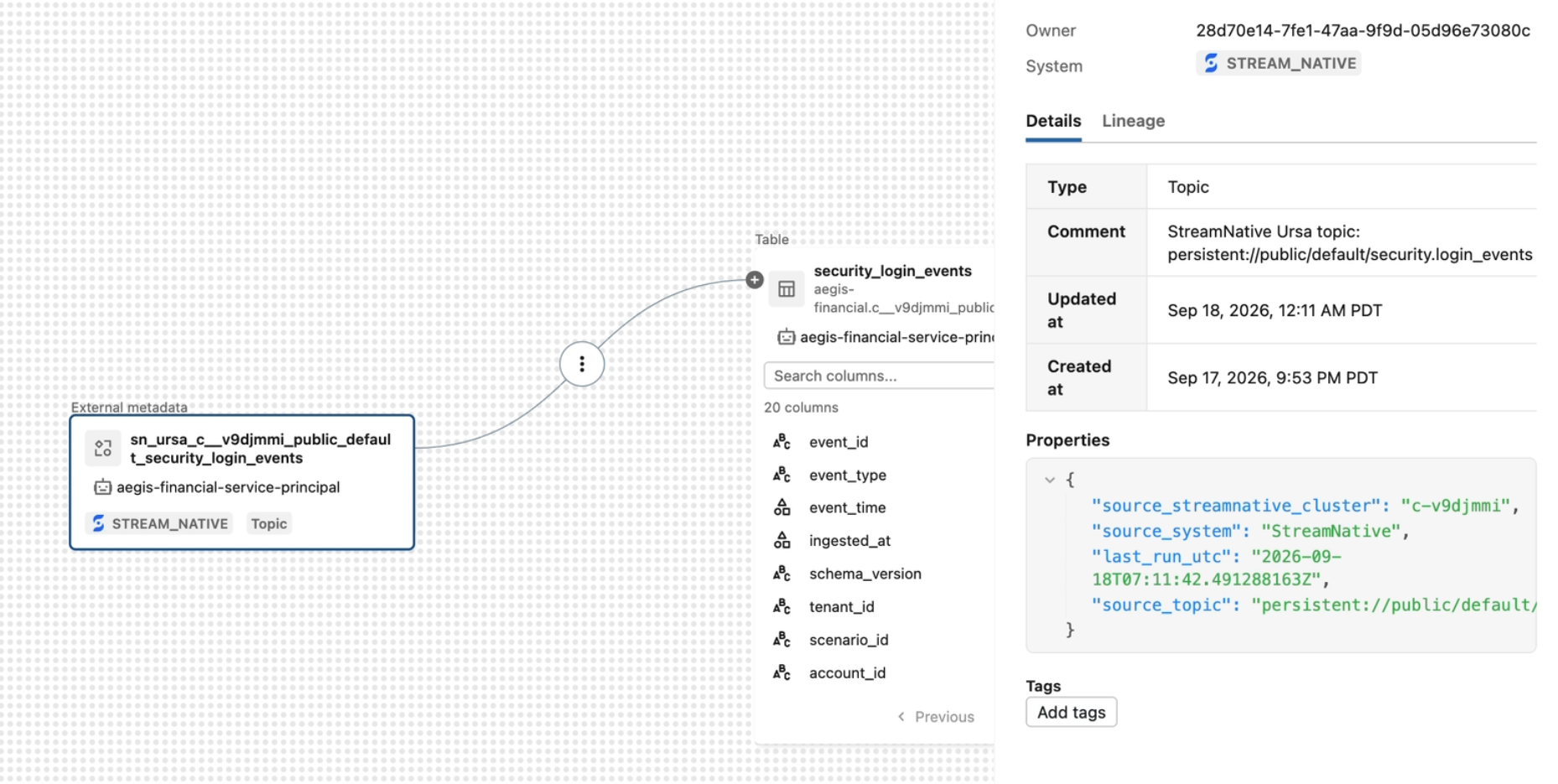
Figure 4. Unity Catalog displays the StreamNative source, its relationship to the table, and source details in one view.
The supplied screenshots include these source properties:
| Property | Example | Value to the user |
|---|---|---|
| source_system | StreamNative | Identifies the platform supplying the stream. |
| source_streamnative_cluster | c-v9djmmi | Identifies the source cluster. |
| source_topic | persistent://public/default/security.device_signals | Preserves the full source topic path. |
| last_run_utc | A UTC timestamp recorded in the metadata | Shows when the metadata was last reported to Unity Catalog. |
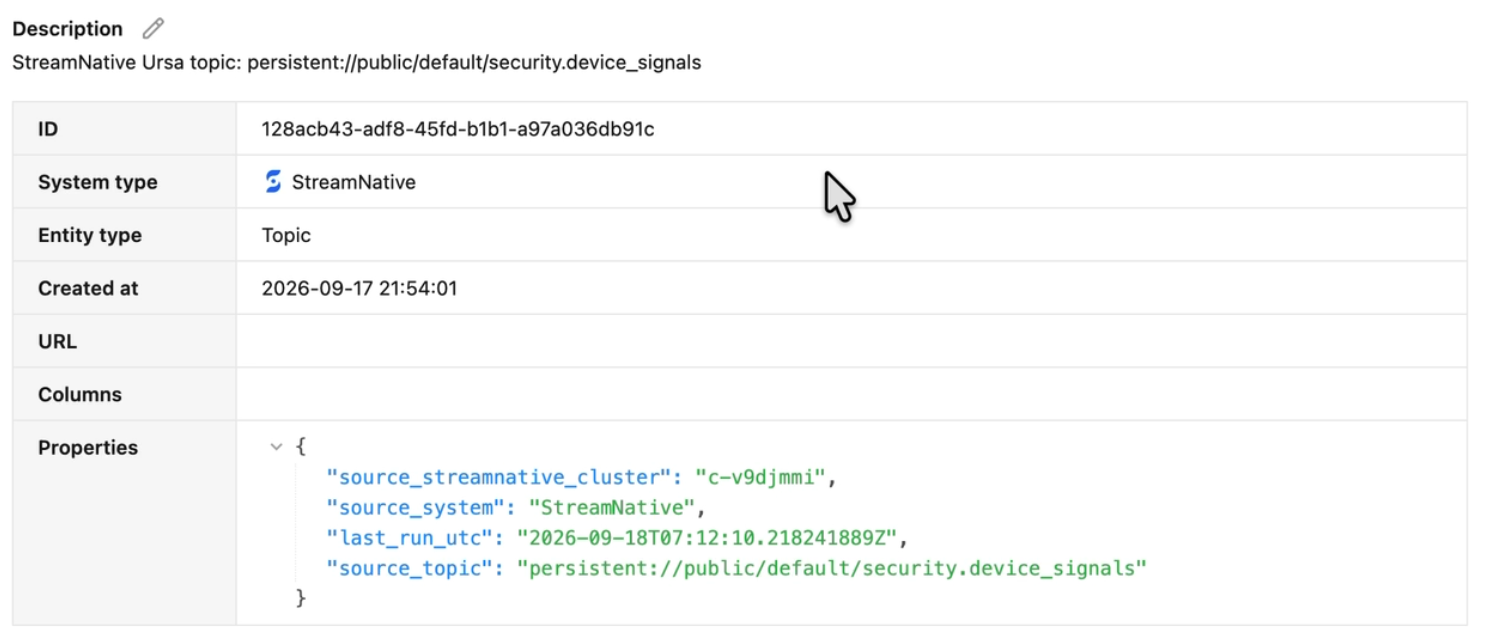
Figure 5. External metadata for security.device_signals includes the source system, cluster, topic path, and run timestamp.
These are source and relationship metadata. The example establishes lineage from topic to table; tracing an individual record or a specific column would require additional lineage information. Likewise, the last_run_utc timestamp indicates when the metadata was last reported to Unity Catalog.
The value of building lineage
Investigate data issues with a known starting point
When login-event data looks unexpected, an analyst can inspect the table’s upstream relationship and identify the contributing topic and cluster. That gives the platform team a concrete place to begin checking producers, schemas, and ingestion behavior, reducing the need to reconstruct the source from memory or separate documentation.
Assess changes through visible dependencies
Before modifying a source topic or its ingestion configuration, engineers can inspect the recorded relationship to its destination table. Where downstream lineage has also been captured, teams can follow the graph further to understand which derived assets may be affected. The usefulness of that analysis grows with the completeness of the recorded relationships.
Support governance with documented provenance
Governance teams gain a visible record of the streaming source behind a lakehouse table. That context supports reviews of data origin and pipeline dependencies, and helps engineers and analysts discuss the same assets using shared identifiers.
Build confidence in analytical and AI inputs
A result is easier to evaluate when its inputs have an identifiable origin. Connecting a table to its streaming source helps teams understand the data feeding security analysis, business reporting, or AI applications. Lineage complements quality and freshness checks by answering a different question: where did this dataset come from?
Make the source part of the data experience
StreamNative’s integration with Databricks BYOL makes streaming provenance available where Databricks users already explore their data. A topic becomes a visible upstream asset, a cluster becomes identifiable source context, and the ingestion relationship becomes part of the Unity Catalog lineage graph.
As enterprises connect real-time streams to lakehouse analytics and AI, those relationships give teams a stronger basis for understanding, investigating, and managing the data they depend on.
Getting Started
Ready to put your streaming data to work? Sign up for a StreamNative Cloud trial and explore the Stream Materialization Framework. Choose a topic and the destination that fits your workload—lakehouse tables, ClickHouse tables, MongoDB collections, or OpenSearch indexes—and start building your analytics, application, or search experience with streaming data.


.png&w=1536&q=100)