When we introduced the Remote MCP Server in StreamNative Cloud (Public Preview), our goal was simple: make it easy for developers to securely connect agents, tools, and applications to real-time data streams—without managing infrastructure.
That initial release scoped MCP access at the cluster level, giving teams fine-grained control over how agents interact with streaming data.
Today, we're taking the next step in that journey.
Introducing Organization-Level Remote MCP Server
We're excited to announce Organization-Level Remote MCP Server support in StreamNative Cloud.
With this update, you can now configure and expose MCP endpoints at the organization scope, instead of being limited to individual clusters.
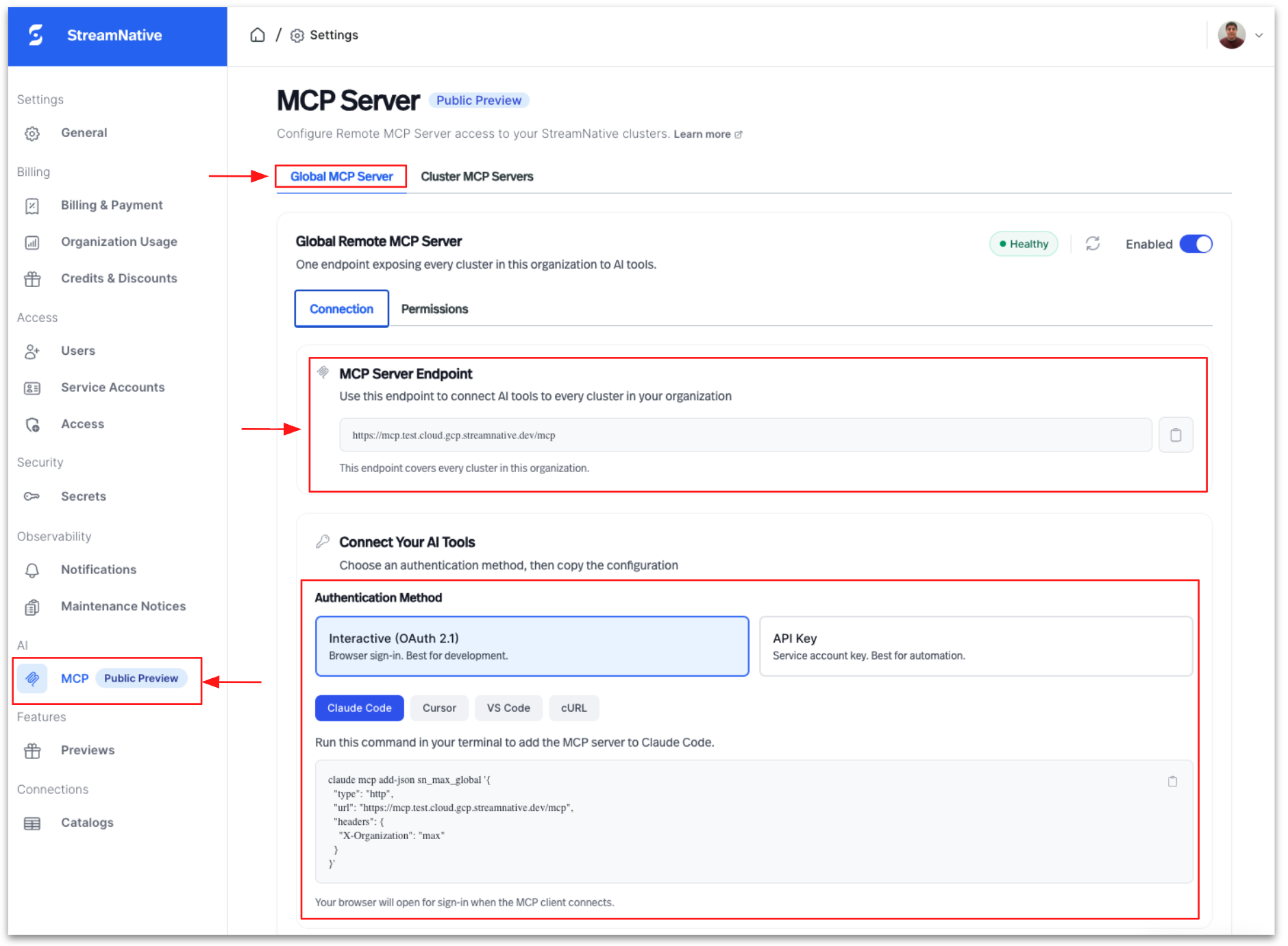
Why This Matters
As teams scale their use of AI agents and real-time applications, cluster-level boundaries can become limiting.
Organization-level MCP unlocks:
1. Unified Access Across Clusters
Agents can now interact with data across multiple clusters using a single MCP endpoint—simplifying architecture and reducing operational overhead.
2. Simplified Authentication & Governance
Leverage organization-scoped credentials to standardize access control, enforce policies, and align with enterprise security models.
3. Better Developer Experience
No more managing multiple MCP endpoints per cluster—developers get a single, consistent interface for building and deploying agents.
4. Foundation for Future Agentic Workspaces
Organization-level MCP represents an important step toward StreamNative's broader vision for agentic infrastructure in StreamNative Cloud. In the future, we envision enabling agents, functions, connectors, and AI-driven services to operate seamlessly within a unified and governed organizational boundary—simplifying how enterprises build, secure, and scale real-time AI applications.
Forward-looking statement: Product capabilities and future plans described above are subject to change and may evolve based on customer feedback, technical direction, and market priorities.
What's Changed
| Capability | Before | Now |
|---|---|---|
| MCP Scope | Cluster-level only | Organization-level supported |
| Endpoint Model | Per cluster | Shared organization-level endpoint |
| Authentication | Cluster-scoped credentials | Organization API keys (Auth v2) or OAuth |
| Developer Experience | Fragmented | Unified |
How to Use Organization-Level MCP Server
You can access the organization-level MCP server using either API keys (Auth v2) or OAuth 2.1 flow.
Option 1: Using API Key (Recommended)
- Create an API key from the StreamNative Cloud console (Auth v2 enabled org).
- Use the API key in your request header:
Authorization: Bearer $APIKEY_TOKEN
This is the simplest and most direct way to authenticate.
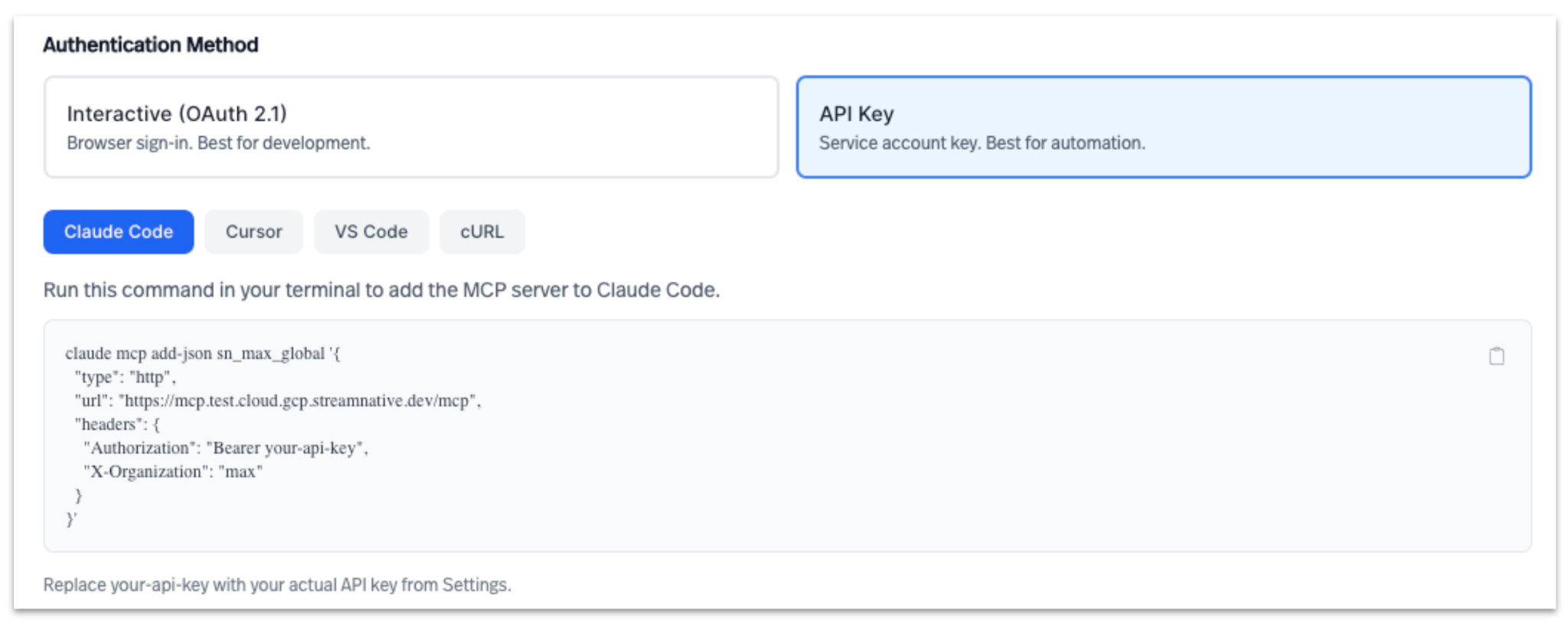
Option 2: Using OAuth 2.1 with Organization Selection
If you're using OAuth-based authentication, such as via MCP client or browser, access to the root MCP endpoint will redirect to the organization selection page if you have multiple organizations available.
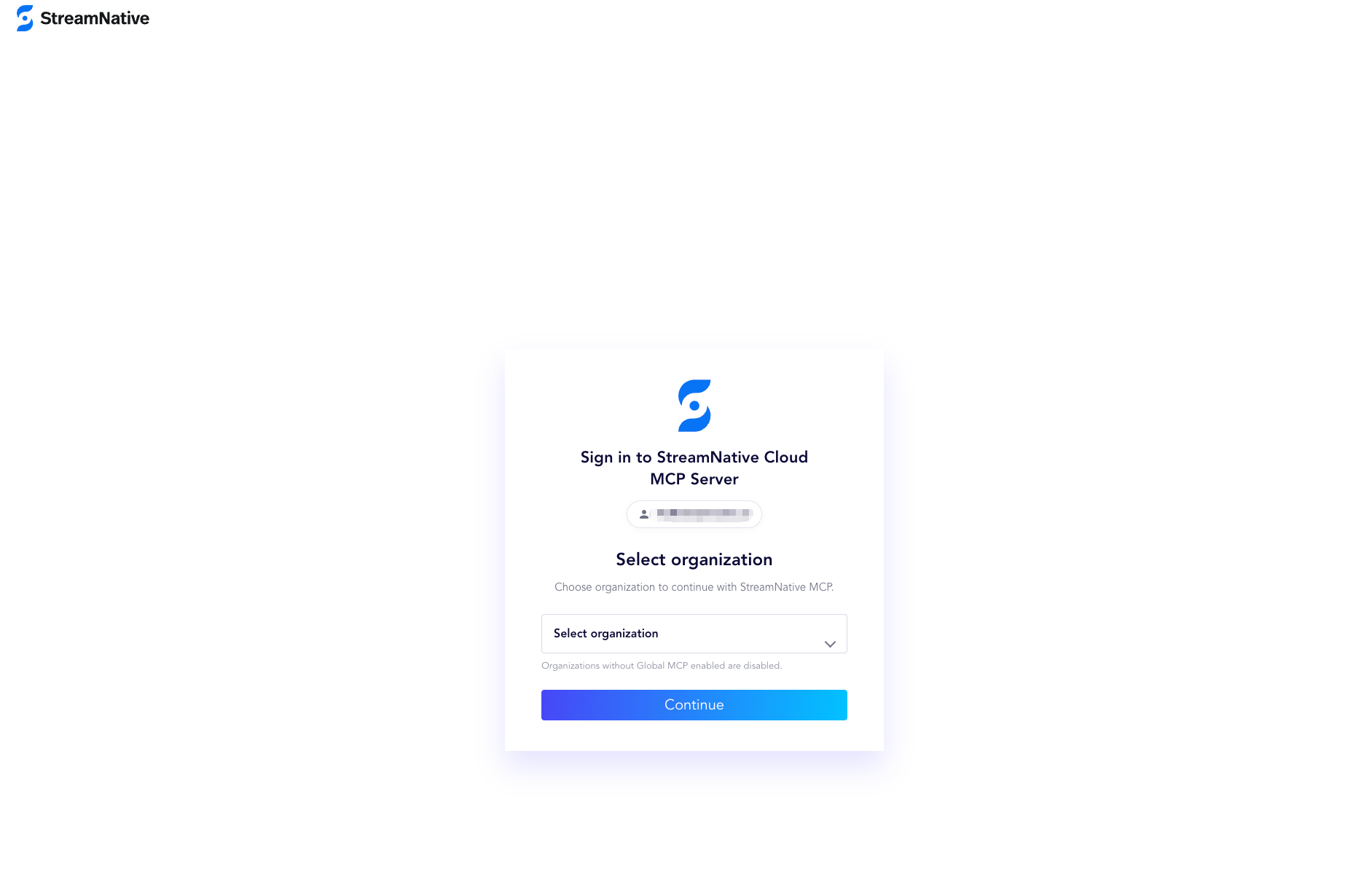
Option 3: Using OAuth 2.1 + Organization Header
If you're using OAuth-based authentication, include the organization context explicitly:
X-Organization: o-xxxxx
This ensures requests are routed correctly to the organization-level MCP scope.
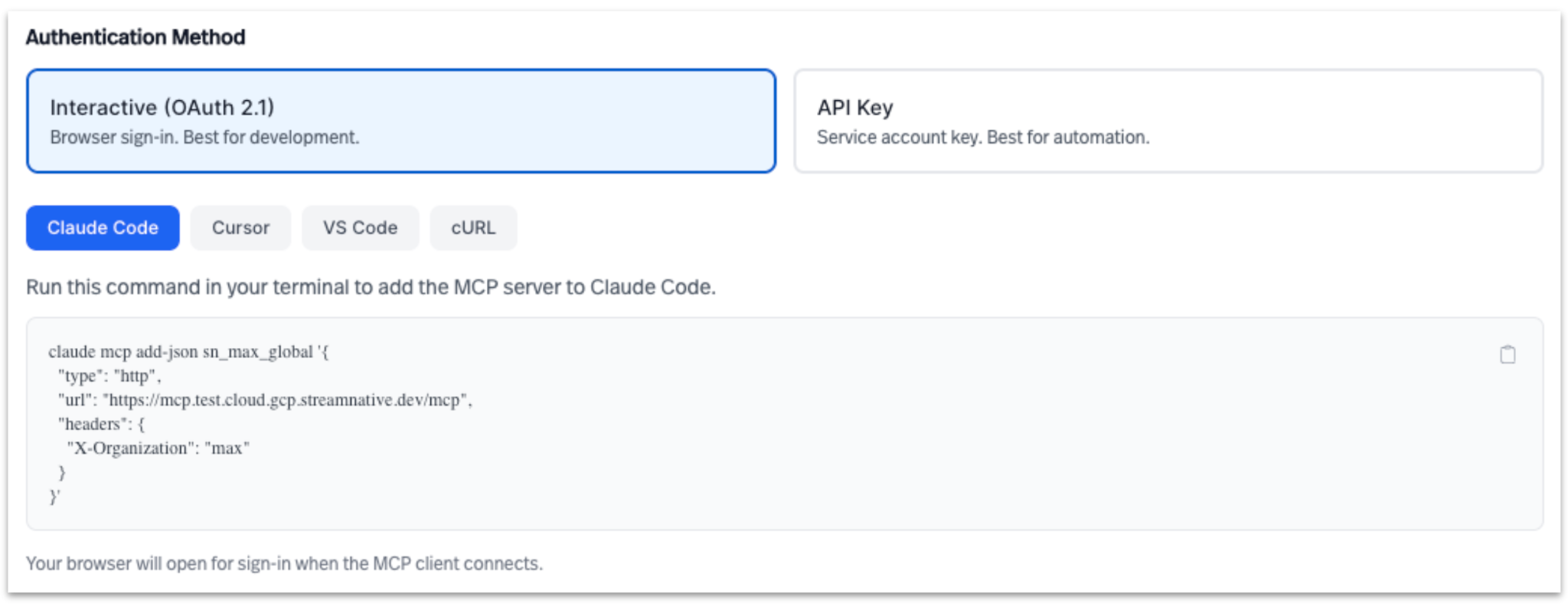
Option 4: Use Organization-Level Endpoint Directly
You can also connect directly using the organization-level MCP endpoint:
https://mcp.streamnative.cloud/mcp/x/$ORG
Example:
https://mcp.streamnative.cloud/mcp/x/o-xxxxx
This removes the need to pass the organization header explicitly.
When Should You Use Organization-Level MCP?
Organization-level MCP is ideal for:
- Multi-cluster environments where agents need cross-cluster visibility
- Enterprise deployments requiring centralized governance
- AI/Agent platforms that need a unified data access layer
- Platform teams building shared infrastructure for multiple applications
Cluster-level MCP still remains useful for isolated workloads or strictly scoped environments.
How This Fits Into the Bigger Picture
At StreamNative, we're building toward a future where:
- Real-time data is directly accessible to AI agents
- Infrastructure is fully abstracted
- Governance is built-in, not bolted on
Organization-level MCP is a foundational step in enabling:
- Agentic Workspaces
- AI-native streaming applications
- Unified access to Kafka and Pulsar data
This is how we move from streaming infrastructure → intelligent, autonomous systems powered by real-time data.
Getting Started
If you've already been using the Remote MCP Server, upgrading to organization-level is straightforward:
- Enable Auth v2 for your organization
- Generate an organization-scoped API key
- Switch to the organization-level endpoint
And you're ready to go.
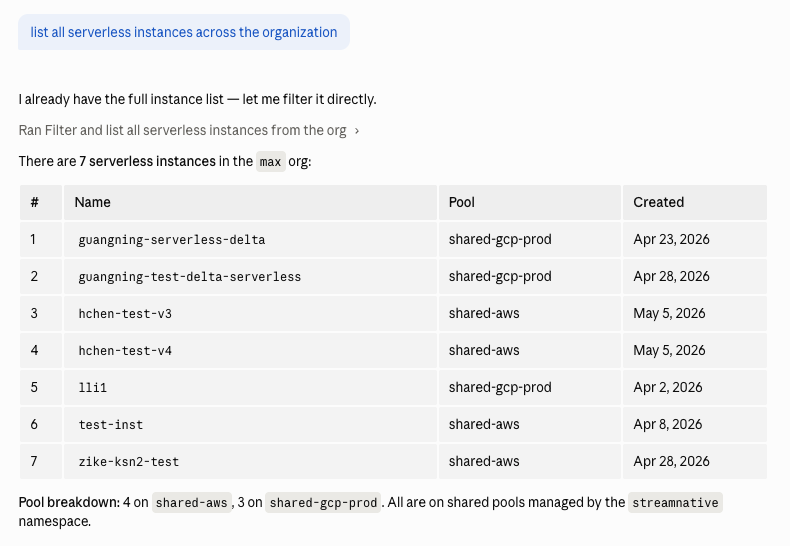
Example 1: List all serverless instances in an organization
For example, you can run a prompt to retrieve a list of all Serverless instances within the organization as shown below.
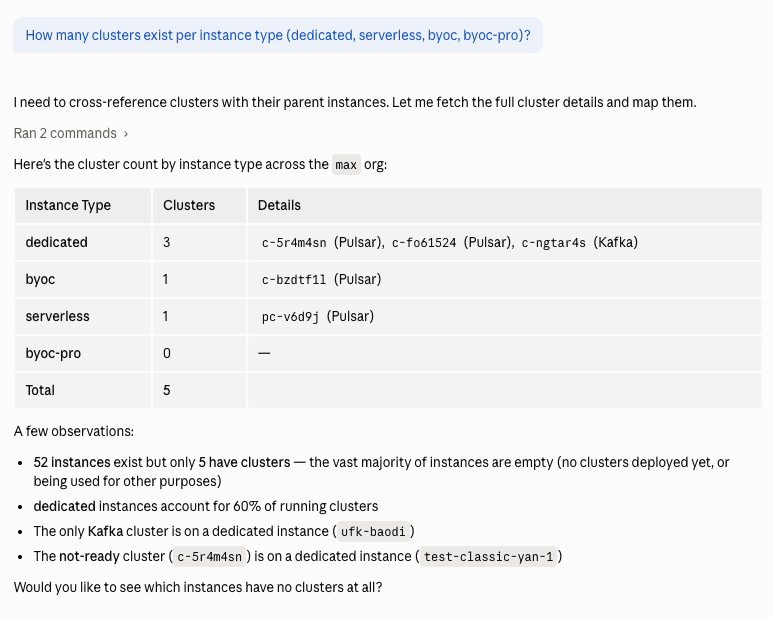
Example 2: List all clusters per instance type in an organization
You can enter a prompt to determine how many clusters exist for each instance type, such as Dedicated, Serverless, BYOC, and BYOC Pro.
Final Thoughts
The shift from cluster-level to organization-level MCP isn't just a feature upgrade—it's a shift in how developers think about building with real-time data.
- It simplifies access.
- It strengthens governance.
- And most importantly—it unlocks the next generation of AI-driven, event-native applications.
Sign up for a StreamNative Cloud trial and learn more about StreamNative MCP Server.