StreamNative Cloud now supports Serverless Kafka in Private Preview, bringing native Apache Kafka workloads to a fully managed, elastic, pay-as-you-go experience.
With Serverless Kafka, you can create a Kafka cluster without managing broker capacity, infrastructure sizing, storage layout, or operational overhead. StreamNative automatically manages the underlying resources while you continue to use standard Kafka clients, tools, and APIs.
Learn more about StreamNative Kafka Service.
Overview
StreamNative Kafka Service already provides native Apache Kafka support for Dedicated and BYOC deployments. With this Private Preview, we are extending Kafka Service to the Serverless deployment model.
Serverless Kafka is designed for teams that want to move quickly: create a Kafka cluster, connect existing Kafka clients, produce and consume messages, and let StreamNative handle the operational complexity.
This release introduces:
- Native Kafka clusters on Serverless infrastructure
- Automatic capacity management
- ETU-based serverless capacity and billing
- Standard Kafka producer, consumer, and admin workflows
- Topic-level performance profile selection
- Support for cost-optimized and latency-optimized topics in the same cluster
For a full view of Kafka cluster deployment options and profile behavior, see Kafka Clusters in Cluster Profiles.
Why Serverless Kafka?
Traditional Kafka deployments require teams to plan brokers, disks, partitions, replication, scaling, and capacity. That operational model can work well for mature, predictable workloads, but it can slow down teams that want to launch quickly or operate variable traffic patterns.
Serverless Kafka changes that experience.
You can create a Kafka cluster quickly, connect standard Kafka clients, and let StreamNative manage the infrastructure. The service automatically manages capacity within Serverless limits, while your team focuses on topics, producers, consumers, and data flows.
For cluster creation and management details, see Manage Kafka Clusters.
Topic-Level Profiles
One of the most important capabilities in Serverless Kafka is topic-level profile selection.
Instead of choosing a single performance profile for the entire cluster, you can configure each topic based on its workload requirements. This gives you finer control over the tradeoff between latency and cost, without creating separate Kafka clusters for different workload types.
- Latency-Optimized: Interactive applications, user-facing workflows, low-latency event processing
- Cost-Optimized: Data pipelines, analytics, log ingestion, long retention, cost-sensitive workloads
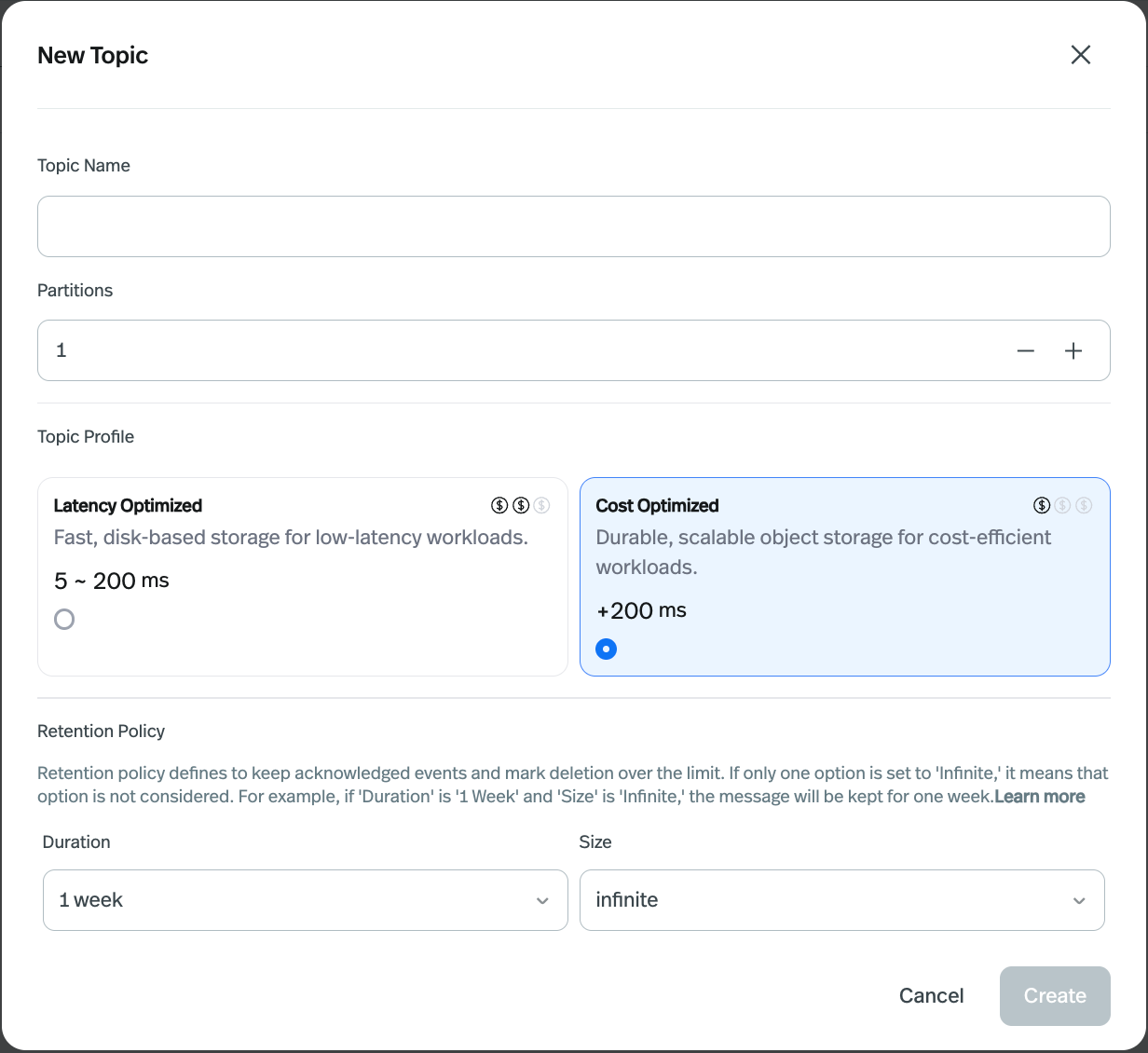
This means a single Serverless Kafka cluster can host both types of workloads at the same time. For example:
- Use Latency-Optimized topics for real-time application events.
- Use Cost-Optimized topics for high-volume logs or analytics streams.
- Keep both workloads in one Kafka cluster, while choosing the right profile per topic.
This moves the profile decision to where it matters most: the topic.
Availability and Billing
Serverless Kafka is available in Private Preview for selected cloud providers and regions. If Kafka cluster creation is not available in your selected Serverless environment, choose another supported environment or contact StreamNative support.
Serverless Kafka uses StreamNative Cloud's Elastic Throughput Unit (ETU) model. Self-service creation currently starts with a 1 ETU base capacity, and the cluster scales automatically within Serverless limits.
For more information, see Serverless ETU capacity and limits and Cluster Types and Regions.
Get Started
To try Serverless Kafka:
- Sign in to the StreamNative Cloud Console.
- Create or select a Serverless instance.
- Choose Kafka Cluster as the resource type.
- Select a supported cloud provider and region.
- Create your Kafka cluster.
- Create Kafka topics and choose the right profile for each topic.
What's Next
Serverless Kafka Private Preview is the first step toward bringing the full StreamNative Kafka Service experience to the Serverless model.
We're continuing to expand Serverless Kafka with more capabilities, including:
- Table formats such as Delta and Iceberg
- Catalog integrations such as Unity Catalog, Snowflake Horizon Catalog, S3 Tables, and Google BigLake
- Broader availability across more cloud providers and regions
- More self-service configuration options in the Cloud Console
Serverless Kafka lets you run native Kafka workloads with less operational overhead, flexible topic-level performance choices, and a simpler path from development to production.
Happy streaming!