
As enterprises accelerate their adoption of the lakehouse architecture, the need to combine real-time streaming data with governed, AI-ready data platforms has never been greater. Organizations increasingly rely on platforms like Databricks to power analytics, machine learning, and AI workloads on top of open table formats such as Delta Lake.
Organizations often face challenges such as:
- Manual lifecycle management of storage locations and table metadata
- Lack of automatic optimization such as compaction and clustering
- Governance gaps due to storage being managed outside Unity Catalog
- Additional operational complexity to maintain performance and reliability
While external tables provide flexibility, they place the burden of storage management, optimization, and governance coordination on platform teams.
As enterprises move toward governed AI and analytics platforms, they need a better approach --- one where streaming pipelines can directly write to managed, governed tables without operational overhead.
StreamNative has been steadily expanding its lakehouse integration capabilities to support this evolution. On February 3, 2025, StreamNative announced support for streaming data into external Delta tables in Databricks Unity Catalog, enabling customers to operationalize real-time data within their open lakehouse architecture.
Today, we are excited to announce the support for Unity Catalog Managed Tables integration alongside the launch of the new StreamNative Kafka service. As part of StreamNative's Lakehouse integration, this new capability enables organizations to seamlessly stream real-time data from StreamNative Kafka into the Databricks Lakehouse with enhanced governance, simplified table management, and improved performance optimization.
This integration builds on the Delta Kernel SDK and introduces support for catalog commits, which coordinate writes through Unity Catalog for centralized governance and better performance, enabling direct streaming ingestion into managed tables governed by Unity Catalog.
What's New: Direct Streaming into Unity Catalog Managed Tables
Unity Catalog serves as the central governance layer for the Databricks Data Intelligence Platform, providing unified metadata management, access control, lineage, and auditing across data and AI workloads.
With the introduction of managed tables, Databricks further simplifies data operations by allowing Unity Catalog to manage the entire lifecycle of table storage, optimization, and maintenance.
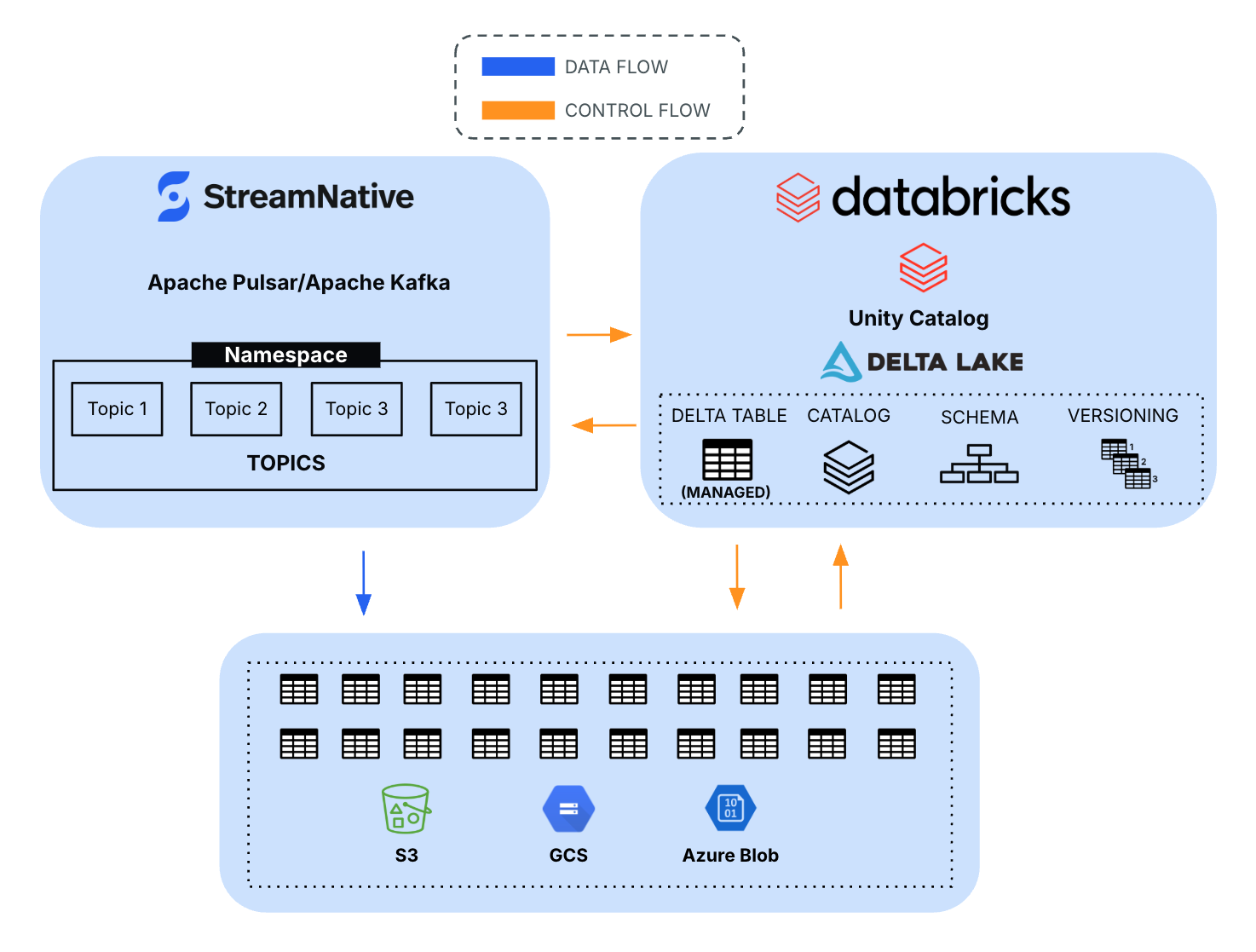
Unlike external tables---where the data lifecycle is managed outside the platform---managed tables allow Databricks to automatically optimize data layout, performance, and storage costs while maintaining strong governance and interoperability across tools.
Key benefits of Unity Catalog managed tables include:
- Automated storage and lifecycle management of Delta tables
- Performance optimizations such as clustering, compaction, and statistics collection
- Fine-grained governance and RBAC through Unity Catalog
- Open interoperability with Delta Lake clients and external compute engines
These capabilities are why organizations standardize on Unity Catalog managed tables as their foundation for analytics and AI workloads.
Bringing Real-Time Streaming to Managed Tables
With this new integration, StreamNative enables streaming pipelines to directly write into Unity Catalog managed tables.
The integration leverages the Delta Kernel SDK, an open interface that allows external systems to interact with Delta tables without requiring Spark. By supporting catalog-based commits, StreamNative can coordinate writes through Unity Catalog, ensuring that all transactions are properly governed and recorded.
This architecture allows organizations to combine:
- Real-time data streaming from Kafka or Pulsar
- Open Delta Lake storage
- Unified governance with Unity Catalog
The result is a fully governed pipeline from streaming ingestion to AI-ready lakehouse tables.
Architecture Overview
The integration follows a streamlined architecture:
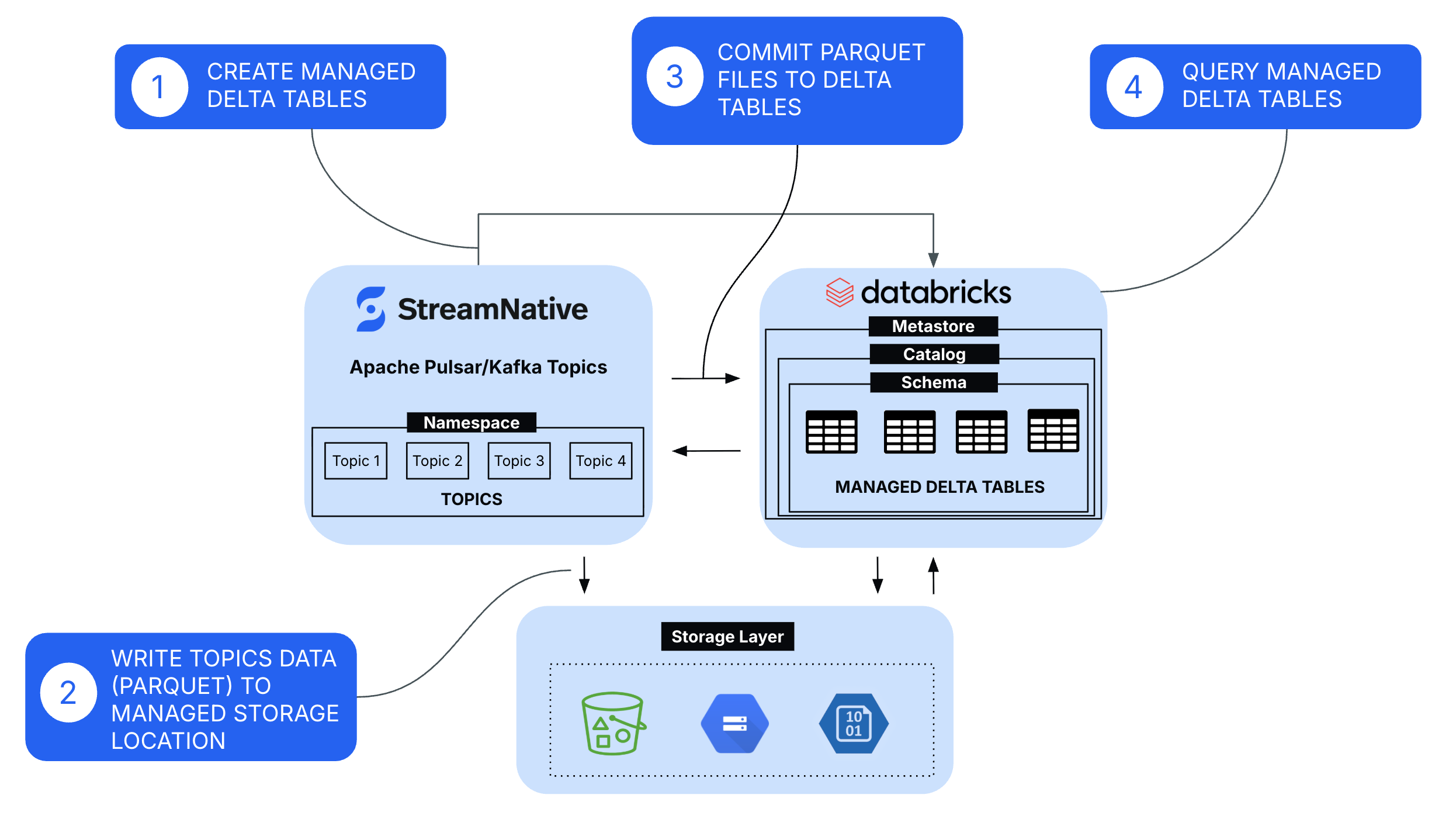
- Create Managed Tables
- Managed tables are provisioned in Databricks Unity Catalog, where Databricks controls the table lifecycle, metadata, storage locations, and governance policies through the metastore, catalog, and schema hierarchy.
- Write Topics Data (Parquet) to Managed Storage Location
- StreamNative continuously ingests Kafka and Pulsar topic data and writes it in Parquet format into the cloud storage, handling batching, file sizing, and schema mapping for efficient downstream processing.
- Commit Parquet Files to Delta Tables
- Using the Delta Kernel SDK and catalog-based commit APIs, StreamNative performs transactional commits to the Delta log, ensuring ACID guarantees, schema enforcement, and immediate table consistency for downstream query engines.
- Query Managed Tables for Analytics and AI Workloads
- Once committed, the data becomes immediately available through Unity Catalog for querying via Databricks SQL, Spark, and AI/ML workloads, benefiting from centralized governance, fine-grained access controls, and performance optimizations such as data skipping and caching.
This architecture allows organizations to eliminate complex batch pipelines and instead move toward continuous streaming ingestion into the lakehouse.
Streaming Data to Managed Tables
This section outlines the steps required to configure StreamNative's native Kafka service to stream data into Unity Catalog Managed tables.
Step 1: Register Unity Catalog in StreamNative Cloud
Register your Databricks Unity Catalog in StreamNative Cloud to enable topic-to-table streaming.
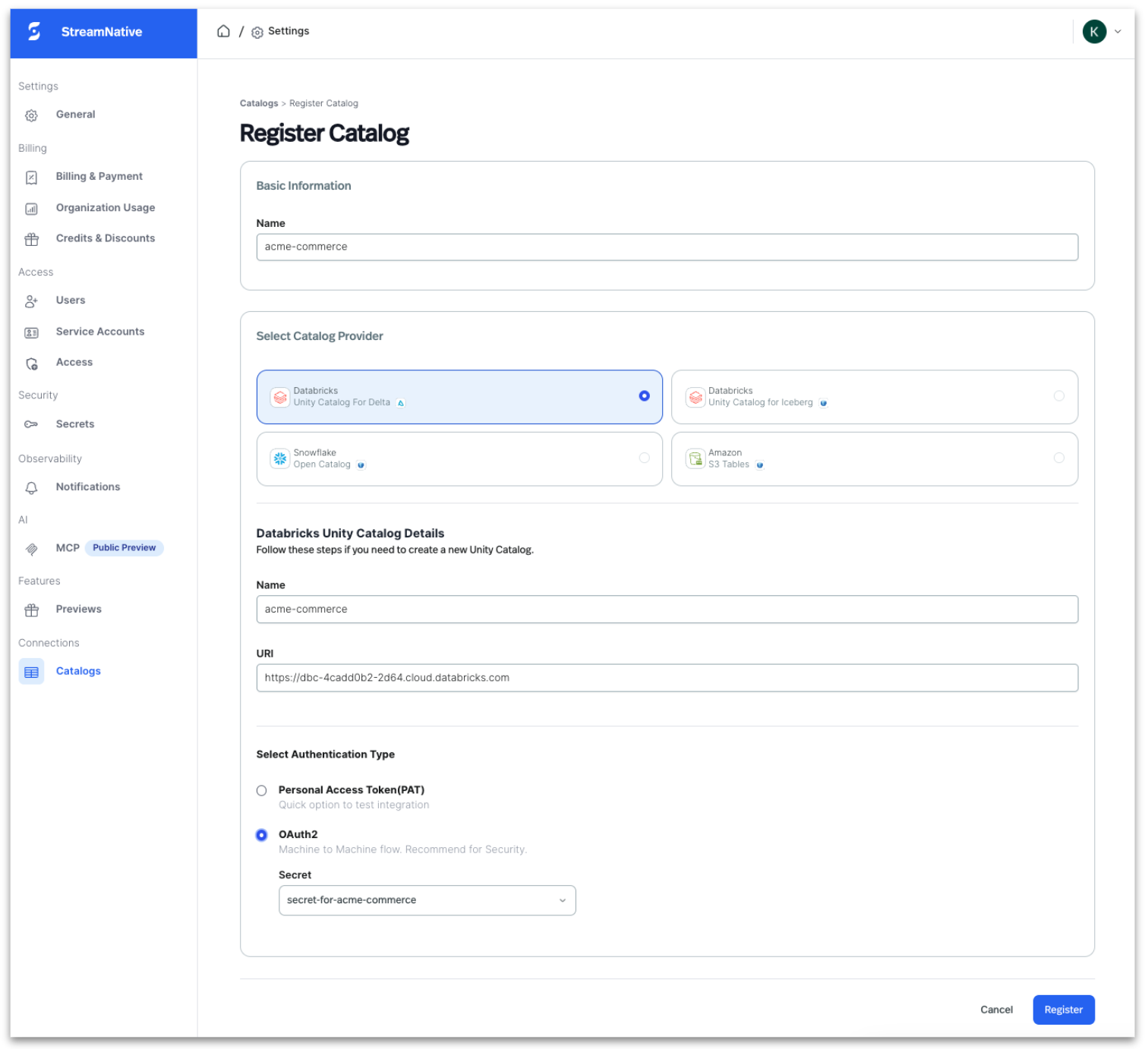
- Navigate to Lakehouse Catalogs in StreamNative Cloud
- Select Register Catalog and choose Databricks Unity Catalog For Delta Lake
- Provide workspace URL, catalog name
- Enter authentication details (OAuth clientID / secret or PAT token)
- Grant catalog, schema, and table write permissions
- Configure credentials in StreamNative
- Validate connectivity to enable metadata discovery
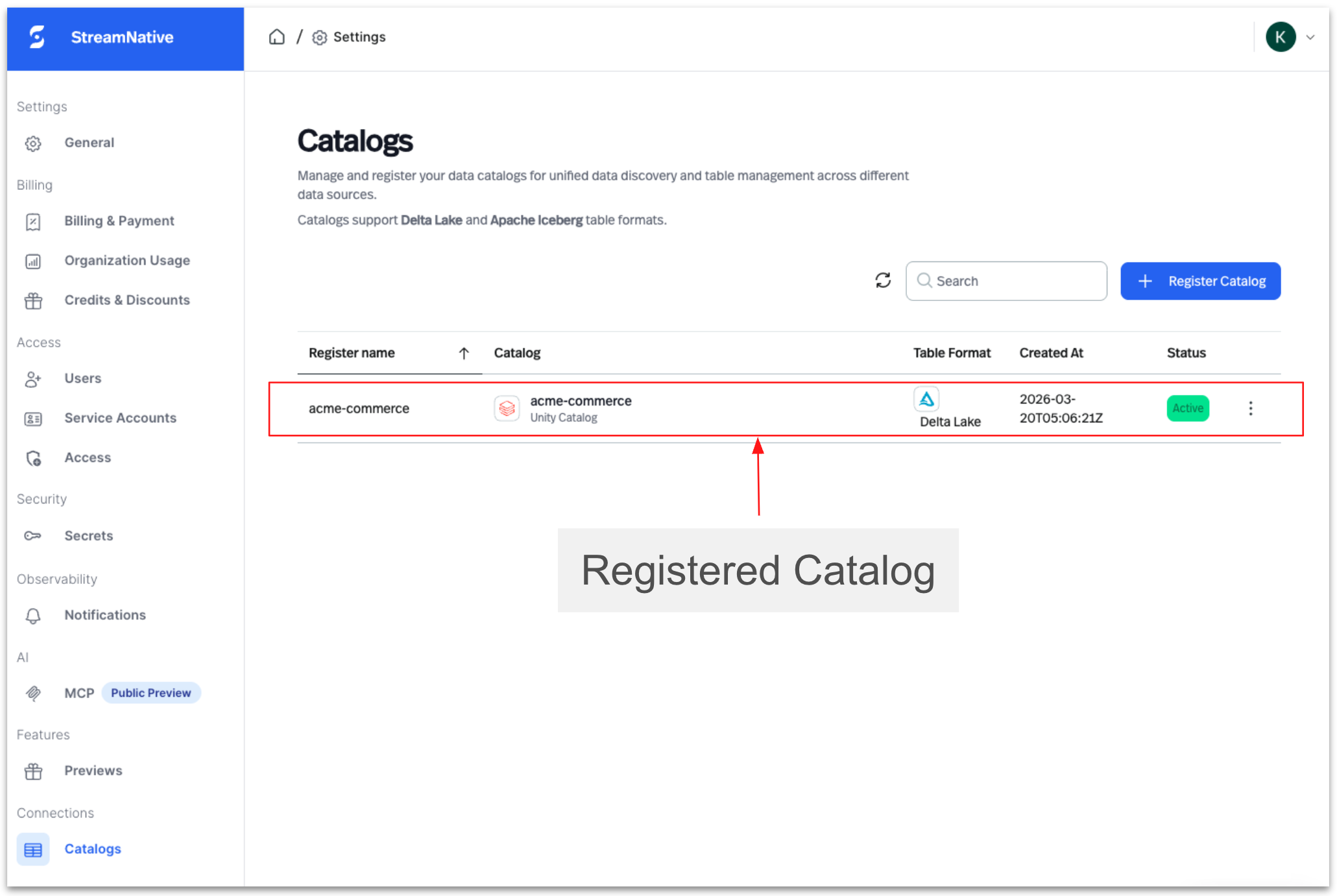
Once registered, StreamNative can map Kafka topics to Delta tables within the selected catalog.
Step 2: Create a Native Kafka Cluster In StreamNative Cloud
Create a StreamNative Kafka cluster and associate it with the registered catalog.
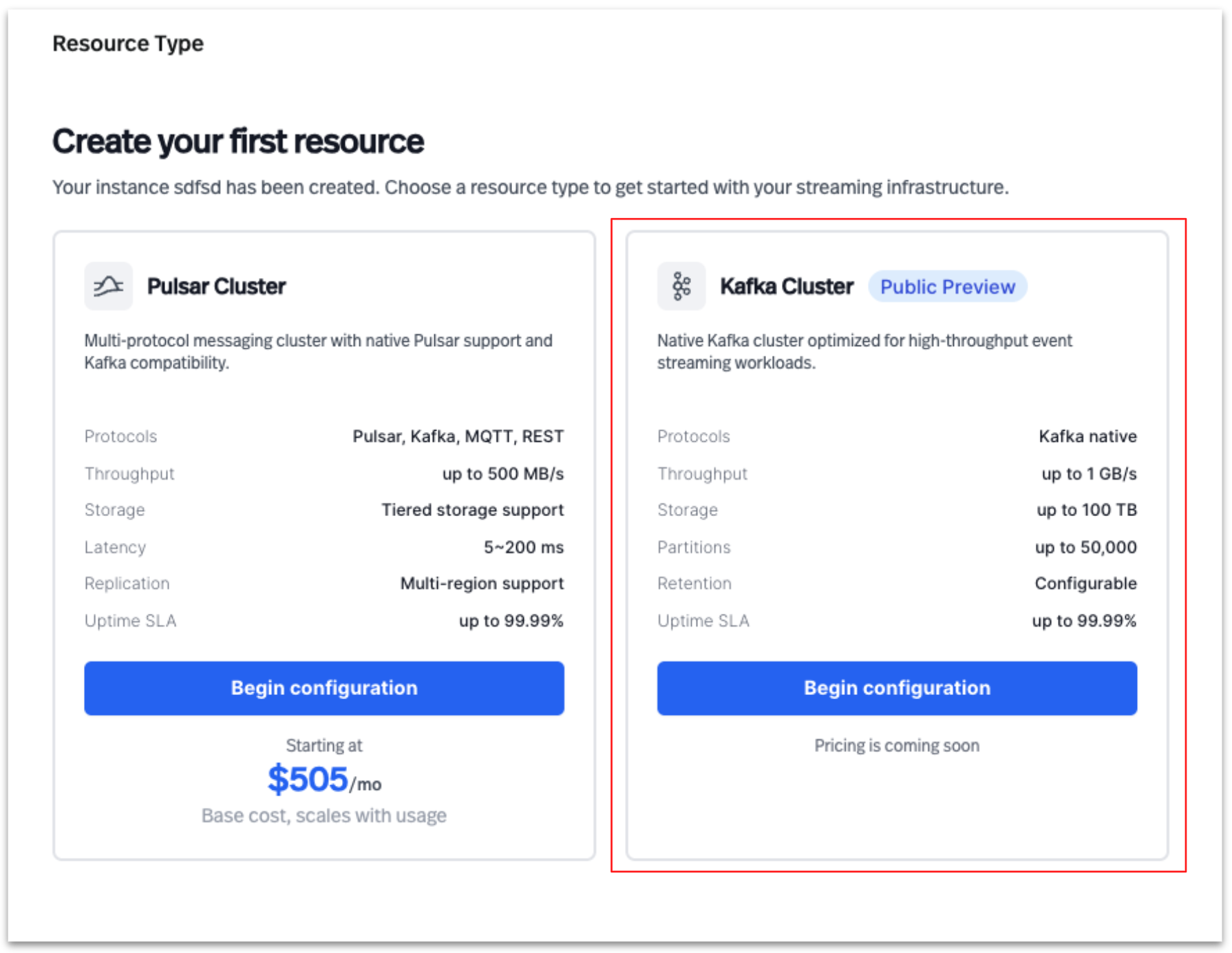
Create a Kafka cluster
Select Kafka Cluster to create a new cluster in StreamNative Cloud
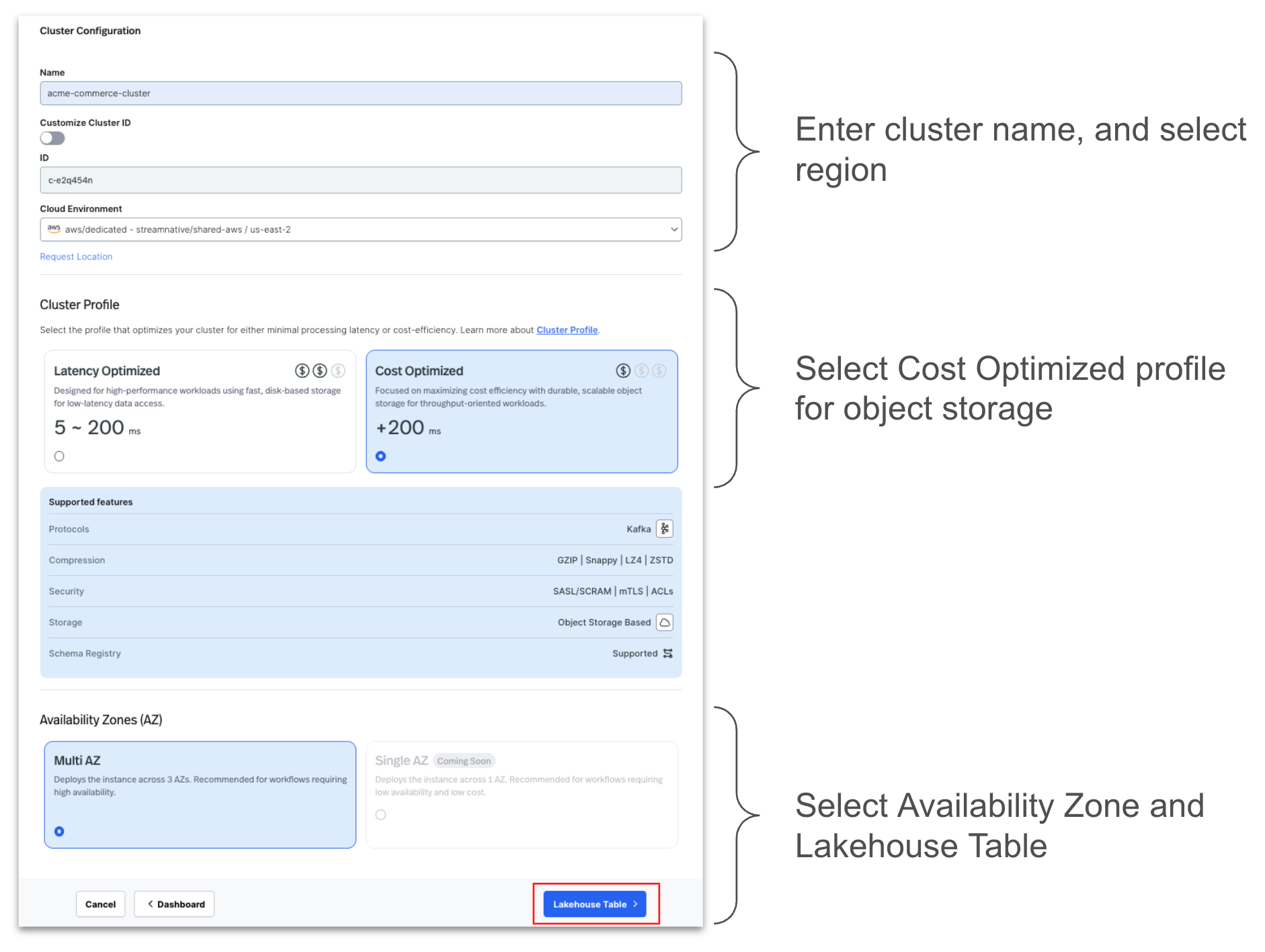
Configure the cluster by entering the details as shown below.
Select the registered Unity Catalog during setup
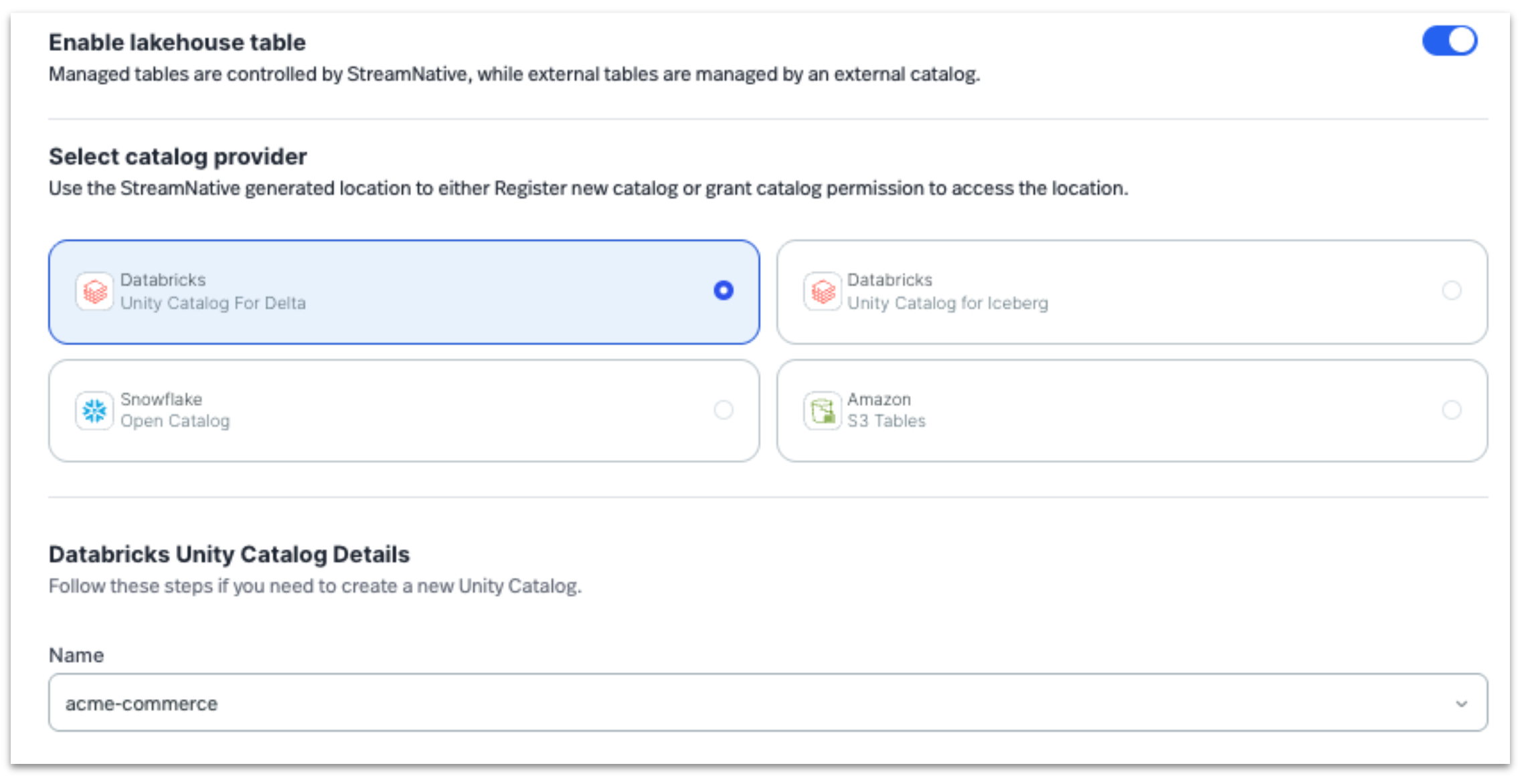
Note: While this example uses a StreamNative native Kafka Dedicated cluster, this lakehouse integration capability is also supported with StreamNative Pulsar clusters. Currently, this integration is supported on Dedicated clusters in Public Preview, with support for Serverless and BYOC deployments planned for future releases.
Step 3: Validate and query ingested data
Once configured, StreamNative automatically streams Kafka topic data into managed tables.
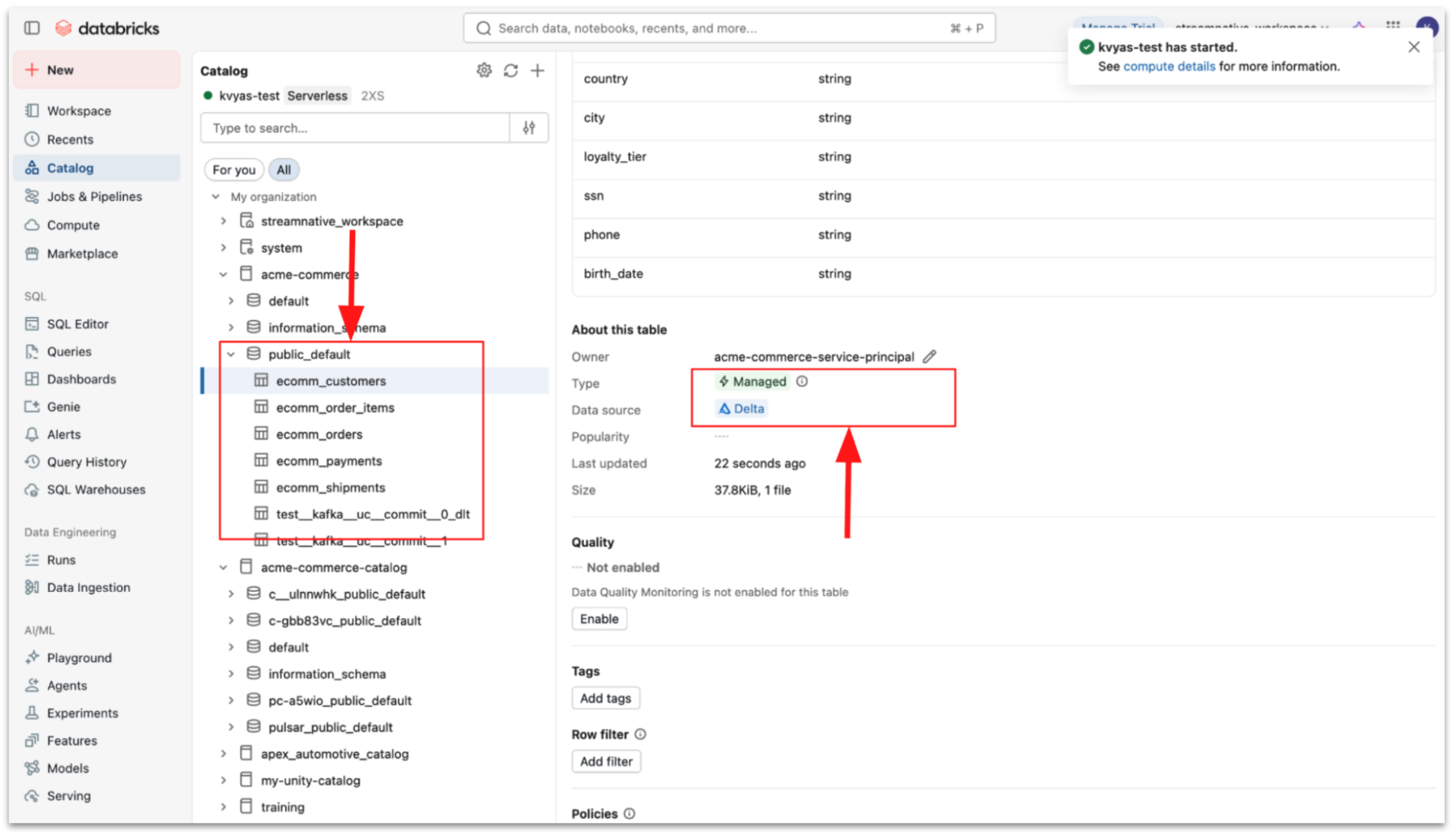
- Topic data is written as Parquet files
- StreamNative performs Delta commits
- Tables become immediately queryable in Databricks
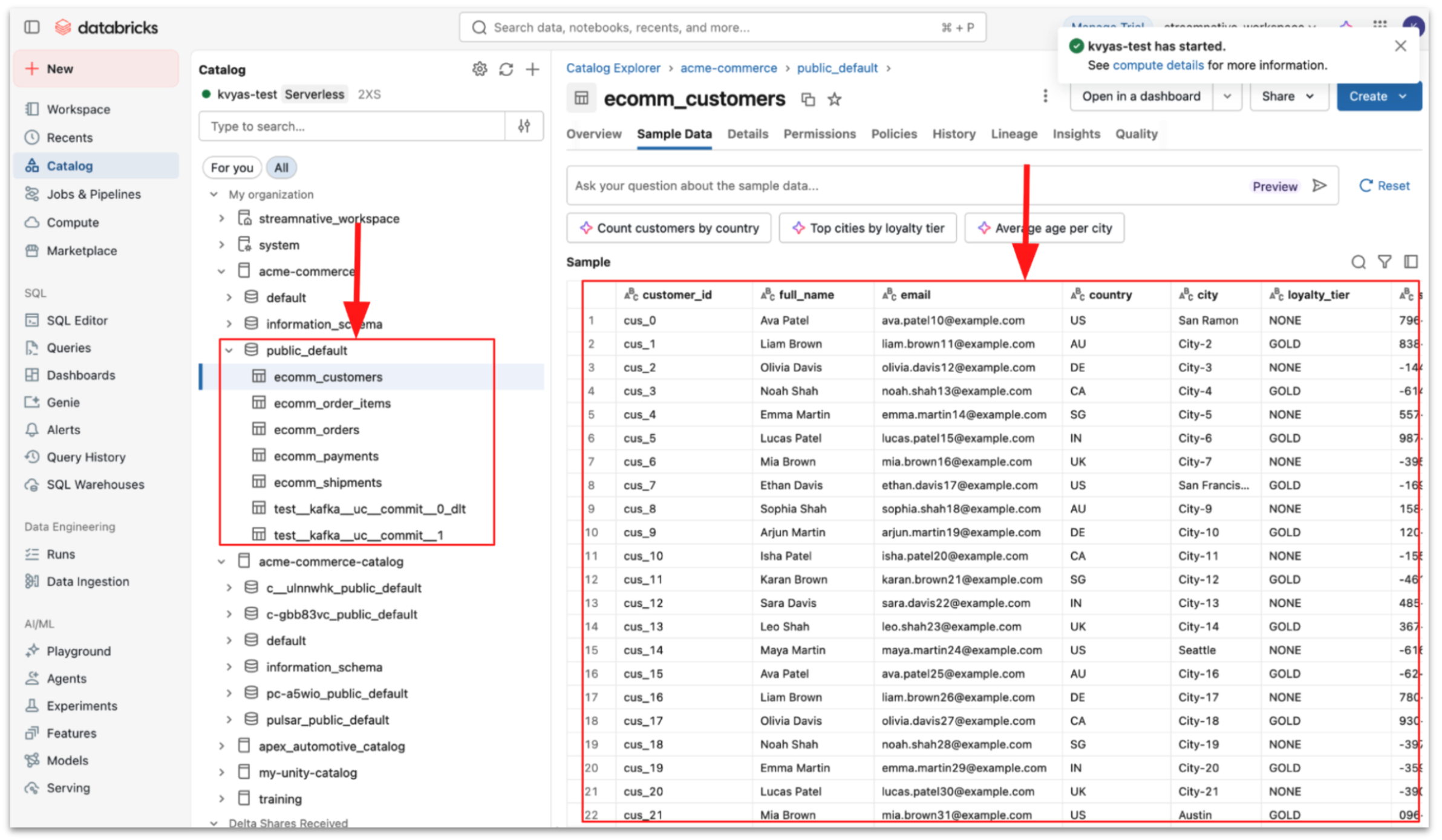
You can then query the data using Databricks SQL or Spark.
Unified Streaming and Lakehouse Architecture
By combining StreamNative's real-time streaming platform with Databricks Unity Catalog managed tables, organizations can build a modern architecture where:
- Streaming systems capture real-time operational data
- Lakehouse tables store governed, analytics-ready datasets
- AI and analytics engines operate on continuously updated data
This integration represents another step toward a fully unified streaming and lakehouse ecosystem built on open technologies such as Kafka, Pulsar, Delta Lake, and Unity Catalog.
Get Started
Support for streaming into Unity Catalog Managed Tables is now available in StreamNative Cloud in Private Preview.
To learn more:
- Try it yourself: Sign up for a free trial to experience how Kafka data from StreamNative can be seamlessly ingested into the Unity Catalog. Use promo code UFK1000 between April 7 and April 14 to receive $1,000 in credits.
- Watch a demo of StreamNative Kafka service